Bukkit API를 사용하여 명령어를 등록하고, 명령어 실행 시 동작을 정의합니다.
Bukkit 명령어 작성
Section titled “Bukkit 명령어 작성”먼저, CommandExecutor 인터페이스를 구현하는 클래스를 생성합니다. 이 클래스는 명령어 실행 시 호출되는 메서드를 정의합니다.
또한, TabCompleter 인터페이스를 구현하여 명령어 자동 완성 기능을 추가할 수 있습니다.
아래와 같이 WhisperCommand.java 파일을 생성하고 작성합니다.
WhisperCommand.java
package dev.erudites.someproject.command;

import org.bukkit.command.Command;
import org.bukkit.command.CommandExecutor;
import org.bukkit.command.CommandSender;
import org.bukkit.command.TabCompleter;
import org.bukkit.entity.Player;
import org.jetbrains.annotations.NotNull;
import org.jetbrains.annotations.Nullable;

import java.util.List;

public class WhisperCommand implements CommandExecutor, TabCompleter {

    @Override
    public boolean onCommand(@NotNull CommandSender sender, @NotNull Command command, @NotNull String label, @NotNull String[] args) {
        if (!(sender instanceof Player player)) {
            sender.sendMessage("This command can only be used by players.");
            return false;
        }

        if (args.length < 2) {
            player.sendMessage("Usage: /whisper <player> <message>");
            return true;
        }

        String targetPlayerName = args[0];
        String message = String.join(" ", args[1]);

        Player targetPlayer = player.getServer().getPlayer(targetPlayerName);
        if (targetPlayer == null || !targetPlayer.isOnline()) {
            player.sendMessage(targetPlayerName + " is not online.");
            return true;
        }

        targetPlayer.sendMessage("Whisper from " + player.getName() + ": " + message);
        player.sendMessage("Whispered to " + targetPlayerName + ": " + message);

        return true;
    }

    @Override
    public @Nullable List<String> onTabComplete(@NotNull CommandSender sender, @NotNull Command command, @NotNull String label, @NotNull String[] args) {
        if (args.length == 1) {
            return sender.getServer().getOnlinePlayers().stream()
                    .map(Player::getName)
                    .filter(name -> name.toLowerCase().startsWith(args[0].toLowerCase()))
                    .toList();
        } else if (args.length > 1) {
            return List.of();
        }
        return List.of();
    }
}
Bukkit 명령어 등록
Section titled “Bukkit 명령어 등록”이제 이 명령어를 메인 클래스에 등록합니다. onEnable 메서드에서 getCommand 메서드를 사용하여 명령어를 등록할 수 있습니다.
SomeProjectPlugin.java
package dev.erudites.someproject;

import dev.erudites.someproject.command.WhisperCommand;
import org.bukkit.plugin.java.JavaPlugin;

public class SomeProjectPlugin extends JavaPlugin {

    @Override
    public void onEnable() {
        // "whisper"로 명령어 등록
        this.getCommand("whisper").setExecutor(new WhisperCommand());
    }
}
plugin.yml 파일에 명령어를 정의해야 합니다. 아래와 같이 작성합니다.
plugin.yml
name: SomeProject
version: 0.1.0
main: dev.erudites.someproject.SomeProjectPlugin
authors:
  - EruditesDev
website: https://erudites.dev
api-version: '1.21'
commands: # 명령어 등록
  whisper: # Main 클래스에 등록한 명령어
    alias: ["w", "귓"] # 명령어의 별칭
실행 및 테스트
Section titled “실행 및 테스트”./gradlew build 명령어로 플러그인을 빌드한 후, 서버를 시작합니다.
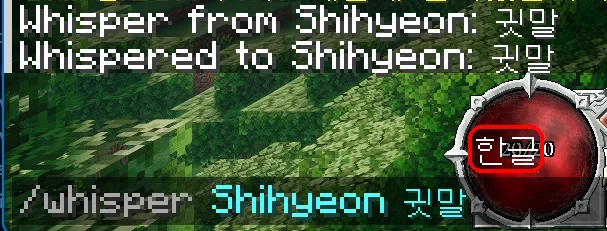
인게임에서 /whisper 명령어를 사용하여 다른 플레이어에게 귓속말을 보낼 수 있습니다.